Showing posts with label animated. Show all posts
Showing posts with label animated. Show all posts
Sunday, May 10, 2015
animated,
create,
gifs,
how,
in,
pse8,
to
0
comments
How to create animated gifs in PSE8
To give an example of animated gif, i have tried an example of an animation between a cloudy day and a sunny day. You can create anything while you try this out :
1. Take any background as shown in the image :

2. Draw a boatsman like as shown below in a new layer or same layer :

3. Now draw some clouds in a new layer a shown below:
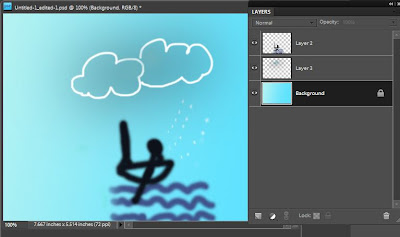
4. Now draw a sun in a separate layer a shown below. If you hide the clouds layer created in step above, you would see the following :
 5. Now merge the layer background and the boatsman by right clicking them and create a duplicate of merged copy. Now merge one of these duplicates with layer Sun and the other duplicate with layer clouds such that you have your layers palette as shown below :

6. Now go to File menu>Save for Web and select the format as Gif, check the checkbox "animate". Check the "loop" checkbox and specify the delay timing. I have mentioned the delay time as 1 second. So this means, my two layers shown above will appear alternatively after a delay of 1 second.
 7. Click Ok and you can check out your animated gif playing in IE or Windows Fax Viewer.

Read more »
1. Take any background as shown in the image :
2. Draw a boatsman like as shown below in a new layer or same layer :
PS : If animation is not visible in the image above , click on the image to open it in the new browser.

Subscribe to:
Posts (Atom)


- Follow Us on Twitter!
- "Join Us on Facebook!
- RSS
Contact