Showing posts with label colors. Show all posts
Showing posts with label colors. Show all posts
Sunday, March 29, 2015
black,
colors,
filling,
in,
photo,
the,
white
0
comments
Filling Colors In The Black White Photo
Filling Colors In The Black-White Photo
All the photos and images you captured are in different colors.. But if you have a black-white OR Old Photo, then you can fill the different colors in that photo and make that photo impressive..
Final view

Step 1:
Take a black-white photo to fill color.


Take a black-white photo to fill color.
Step 2:
Press Ctrl+B (Color Balance).
and set the following setting for each option "shadows", "midtones" and "highlights".
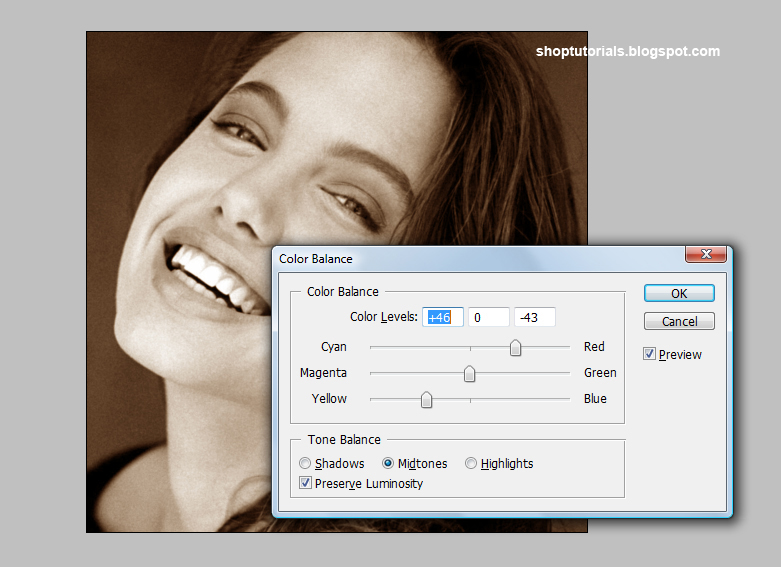
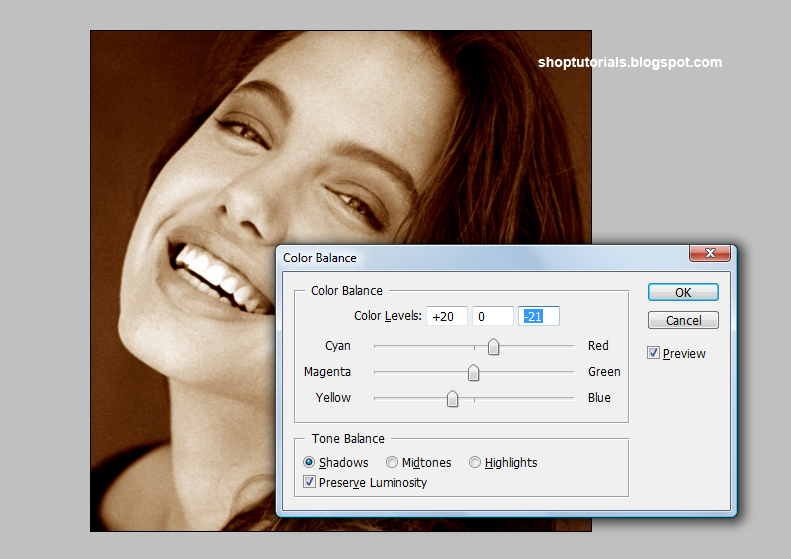
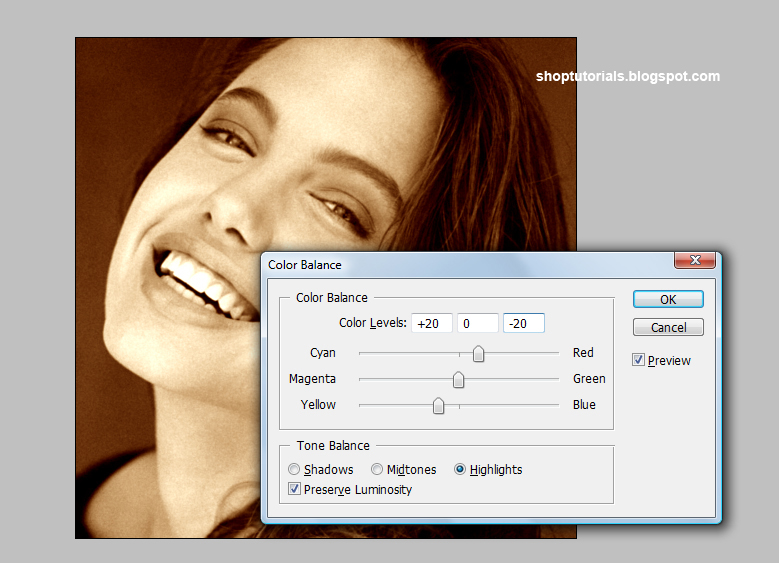
Hit OK.
Press Ctrl+B (Color Balance).
and set the following setting for each option "shadows", "midtones" and "highlights".
Hit OK.
You can give any color shade to the black white photo..
Examples :-


Done..!!

Wednesday, March 18, 2015
a,
bring,
colors,
image,
normal,
to
0
comments
Bring Colors to a normal image
In this tutorial I will show you a non-destructive technique to add vivid colors to your scene, turning it into a spectacular image that can impress your audience easily
Before & After:
Here is the image we will work with

And what we are going to create:

Step 1: Before walking into the main step, we should enhance its brightness and contrast a bit by going to Image>Adjustments>Color Balance. We can find here three options: Shadows, Midtones and Highlights. Adjust each of them as following:


It now looks better:

Step 2: Our scene has three parts: sky, trees and yard. First we will deal with the sky, enhance it by adding blue to the clouds. Use the Pen tool and make a closed path on the sky area, no need to be too exact.

Right click on the sky and choose Make Selection

The path is now changed into a selection (with moving dots)
Step 3: Create a new layer and select the Gradient Tool, set the gradient color from #066caa to white and Reflected Gradient. You should use Reflected Gradient instead of Linear Gradient to enhance its contrast.

Step 4: Press Ctrl-D to deselect the selected area. Go to Filter>Blur>Gaussian Blur and use a radius of 25.2 pixels

Step 5: Now change the blending mode of this layer to Overlay. This mode keeps the color of your current layer and adding it to the below layer so we can see blue in our sky

Step 6: Repeat this technique (from step 2) with the yard but you should use orange gradient instead of blue gradient. If you feel a bit confused, follow the images below:
+ Make a closed path and turn it into a selection:

+ Add a suitable gradient:

+ Blur it and change the blending mode to Overlay:

Step 7: Repeat this technique one more time with the trees, you should use a small radius of Gaussian Blur


And here is the dreamy result we will acquire:
This technique produces a stunning photo effect without destroying the original background. Its based on Blur effect and Overlay mode. Remember you can easily adjust the colors and brightness in each layer by reducing its Opacity and Fill parameters.
Read more »
Before & After:
Here is the image we will work with
And what we are going to create:
Step 1: Before walking into the main step, we should enhance its brightness and contrast a bit by going to Image>Adjustments>Color Balance. We can find here three options: Shadows, Midtones and Highlights. Adjust each of them as following:
It now looks better:
Step 2: Our scene has three parts: sky, trees and yard. First we will deal with the sky, enhance it by adding blue to the clouds. Use the Pen tool and make a closed path on the sky area, no need to be too exact.
Right click on the sky and choose Make Selection
The path is now changed into a selection (with moving dots)
Step 3: Create a new layer and select the Gradient Tool, set the gradient color from #066caa to white and Reflected Gradient. You should use Reflected Gradient instead of Linear Gradient to enhance its contrast.
Step 4: Press Ctrl-D to deselect the selected area. Go to Filter>Blur>Gaussian Blur and use a radius of 25.2 pixels
Step 5: Now change the blending mode of this layer to Overlay. This mode keeps the color of your current layer and adding it to the below layer so we can see blue in our sky
Step 6: Repeat this technique (from step 2) with the yard but you should use orange gradient instead of blue gradient. If you feel a bit confused, follow the images below:
+ Make a closed path and turn it into a selection:
+ Add a suitable gradient:
+ Blur it and change the blending mode to Overlay:
Step 7: Repeat this technique one more time with the trees, you should use a small radius of Gaussian Blur
And here is the dreamy result we will acquire:
This technique produces a stunning photo effect without destroying the original background. Its based on Blur effect and Overlay mode. Remember you can easily adjust the colors and brightness in each layer by reducing its Opacity and Fill parameters.
Monday, March 16, 2015
are,
color,
colors,
king,
theory,
why
0
comments
Why Colors are King Color Theory
Author: Brian McGregor
 You may not realize it, but many of your website visitors form an immediate opinion about you and your website. The opinion that is formed in this instantaneous way is done so subconsciously. You might wonder why this happens. It has absolutely nothing to do with the text on your website. And yet your visitor will still form their instant opinion without even reading a single word of your costly copy.
It doesnt matter either, whether the quality of the images on your website are of the highest. Nor does your offer matter. You could be promoting a sensational deal, like selling dollars for dimes. But this too, will be overlooked by the site visitor. This is because the instant opinion is made when your web page is displayed to your visitor. You may have guessed there is something subliminal at work here. In a way, that is right. Immediate opinions are formed by visitors to every single website. This may surprise you, but the answer is colors. Your visitors instant opinion of your website is primarily due to the color scheme which you have used.
This is because colors are psychological. They engender an intuitive reaction which we cant control. We cant help ourselves. Colors bring us these emotions and feelings whether we want them or not! As you will know, millions are spent by big companies in deciding the correct colors of new products and in their marketing campaigns. Big companies realize that colors are a psychological feature, and they can influence our reception of their marketing. In their business propositions, the big companies understand that the use of appropriate colors is a key element. What webmasters have to realize, and this can be very important, is that the same color psychology applies to our web pages.
By the psychological power you could encourage your website visitors to leave your page the instant they see it. No matter what your website is about, it may simply be unsuccessful due to the colors youre using. Forget the text, it might never be read! The good news, however, is that you can use colors to engender a really positive reaction. This color psychology is nothing new. In fact, its been with us for years and years. Whatever our role in life, colors convey emotions to our subconscious mind.
For example, a particular color scheme could convey a good feeling in each of us. However, a different color scheme might convey not so good feelings. In essence, you might send a sense trust, warmth and belonging. Conversely, the feeling sent may be one of distrust, coolness and rejection. The following list gives an idea of the emotions associated with their respective colors:
Red Excitement, energy, danger, love, leadership, sense of power, strength etc
Orange Comfort, steadfastness, cheerfulness, courage, confidence, playfulness, friendliness etc
Yellow Curiosity, brightness, organization, intelligence, joy, amusement, caution etc
Green Harmony, nature, money, healing, health, life, food etc
Blue Trustworthiness, stability, peace, tranquility, love, acceptance, patience etc
Purple Nobility, dignity, independence, royalty, luxury, ambition, wisdom etc
Brown Reliability, nature, comfort, tribal, earthiness, durability, primitive etc
Black Sophistication, dramatic, power, formality, style, health, elegance etc
White Innocence, cleanliness, fresh, goodness, easy, simplicity, purity etc
When designing your web pages, you ideally need to ensure that the color scheme you use is consistent with your offering. The reason is that your visitors subconscious minds will look to reconcile the color with the message. If they are irreconcilable, you will find your visitors click away from your page very quickly. Which means, your visitor will be lost. The important issue therefore is that it is essential the right color scheme is used on your website. If you do this, your website will produce the results youre looking for. In summary, the difference between the right and wrong color scheme on your website can be the difference between profit and loss.
Read more »
You may not realize it, but many of your website visitors form an immediate opinion about you and your website. The opinion that is formed in this instantaneous way is done so subconsciously. You might wonder why this happens. It has absolutely nothing to do with the text on your website. And yet your visitor will still form their instant opinion without even reading a single word of your costly copy.It doesnt matter either, whether the quality of the images on your website are of the highest. Nor does your offer matter. You could be promoting a sensational deal, like selling dollars for dimes. But this too, will be overlooked by the site visitor. This is because the instant opinion is made when your web page is displayed to your visitor. You may have guessed there is something subliminal at work here. In a way, that is right. Immediate opinions are formed by visitors to every single website. This may surprise you, but the answer is colors. Your visitors instant opinion of your website is primarily due to the color scheme which you have used.
This is because colors are psychological. They engender an intuitive reaction which we cant control. We cant help ourselves. Colors bring us these emotions and feelings whether we want them or not! As you will know, millions are spent by big companies in deciding the correct colors of new products and in their marketing campaigns. Big companies realize that colors are a psychological feature, and they can influence our reception of their marketing. In their business propositions, the big companies understand that the use of appropriate colors is a key element. What webmasters have to realize, and this can be very important, is that the same color psychology applies to our web pages.
By the psychological power you could encourage your website visitors to leave your page the instant they see it. No matter what your website is about, it may simply be unsuccessful due to the colors youre using. Forget the text, it might never be read! The good news, however, is that you can use colors to engender a really positive reaction. This color psychology is nothing new. In fact, its been with us for years and years. Whatever our role in life, colors convey emotions to our subconscious mind.
For example, a particular color scheme could convey a good feeling in each of us. However, a different color scheme might convey not so good feelings. In essence, you might send a sense trust, warmth and belonging. Conversely, the feeling sent may be one of distrust, coolness and rejection. The following list gives an idea of the emotions associated with their respective colors:
Red Excitement, energy, danger, love, leadership, sense of power, strength etc
Orange Comfort, steadfastness, cheerfulness, courage, confidence, playfulness, friendliness etc
Yellow Curiosity, brightness, organization, intelligence, joy, amusement, caution etc
Green Harmony, nature, money, healing, health, life, food etc
Blue Trustworthiness, stability, peace, tranquility, love, acceptance, patience etc
Purple Nobility, dignity, independence, royalty, luxury, ambition, wisdom etc
Brown Reliability, nature, comfort, tribal, earthiness, durability, primitive etc
Black Sophistication, dramatic, power, formality, style, health, elegance etc
White Innocence, cleanliness, fresh, goodness, easy, simplicity, purity etc
When designing your web pages, you ideally need to ensure that the color scheme you use is consistent with your offering. The reason is that your visitors subconscious minds will look to reconcile the color with the message. If they are irreconcilable, you will find your visitors click away from your page very quickly. Which means, your visitor will be lost. The important issue therefore is that it is essential the right color scheme is used on your website. If you do this, your website will produce the results youre looking for. In summary, the difference between the right and wrong color scheme on your website can be the difference between profit and loss.
Subscribe to:
Comments (Atom)


- Follow Us on Twitter!
- "Join Us on Facebook!
- RSS
Contact