Showing posts with label strokes. Show all posts
Showing posts with label strokes. Show all posts
Wednesday, April 29, 2015
cs6,
gradients,
illustrator,
on,
strokes,
tutorial
0
comments
Illustrator CS6 Tutorial Gradients on Strokes
We had to wait 25 years, but the day has finally arrived. Adding a gradient to a stroke in Illustrator CS6 now is as simple as selecting an object, and choosing a gradient from the Stroke menu.
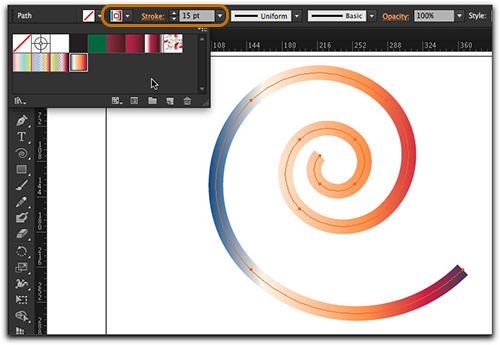
Fantastic with new version of Illustrator CS6 ! But what are the possibilities?
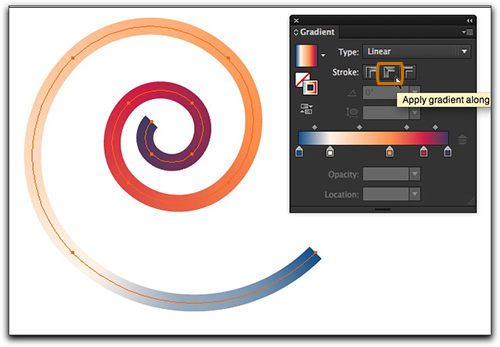
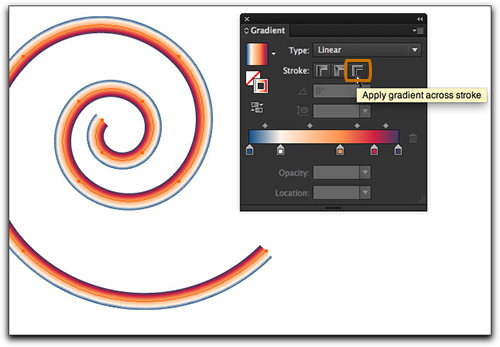
First of all, we now have three direction options in the Stroke panel: gradient within stroke, along stroke and across stroke in Illustrator CS6 Tutorial . All three options are accessible via the Gradient panel. The image above shows the default gradient within the stroke.The image below shows the gradient along the stroke.


Read more »
Fantastic with new version of Illustrator CS6 ! But what are the possibilities?
First of all, we now have three direction options in the Stroke panel: gradient within stroke, along stroke and across stroke in Illustrator CS6 Tutorial . All three options are accessible via the Gradient panel. The image above shows the default gradient within the stroke.The image below shows the gradient along the stroke.
And this image shows the gradient across the stroke very effective in this verson Illustrator CS6 Tutorial
Now let’s add some variable widths to our spiral: with Illustrator CS6 Tutorial
And let the fun begin! with Illustrator CS6 Tutorial : Gradients on Strokes

Subscribe to:
Posts (Atom)


- Follow Us on Twitter!
- "Join Us on Facebook!
- RSS
Contact