Showing posts with label conversions. Show all posts
Showing posts with label conversions. Show all posts
Monday, March 16, 2015
and,
black,
color,
conversions,
easy,
in,
make,
photo,
photoshop,
white
0
comments
Easy Make Color Photo Black and White Conversions In Photoshop
This Photoshop tutorial is so easy , we’ll look at an easy way to get fast yet high quality black and white conversions out of our color photos. Normally, for high quality black and white results.
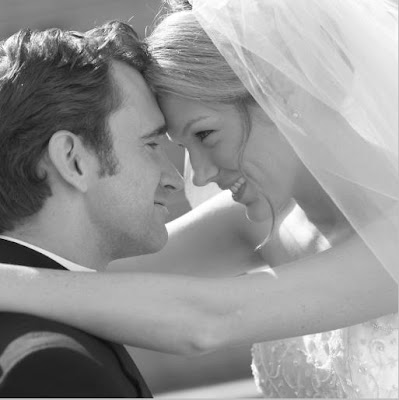
Final Image Result:
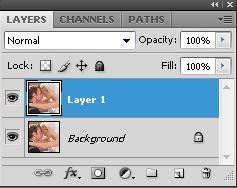
Step 1: Duplicate Background Layer
Shortcut Key.keyboard Press Ctrl+J
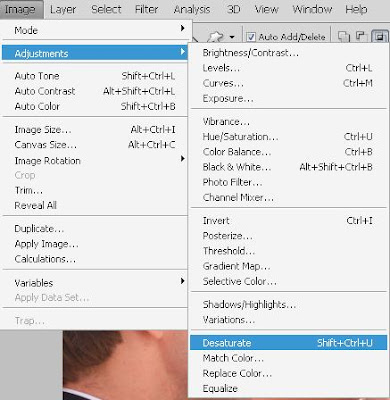
Step 2: Image > Adjustments > Desaturate.
keyboard shortcut, Shift+Ctrl+U.
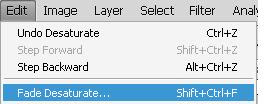
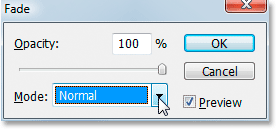
Step 3: Go Edit > Fade Desaturate
keyboard shortcut, Shift+Ctrl+F
Step 4: Change The Blend Mode To “Color”
Opacity 100% Mode Color
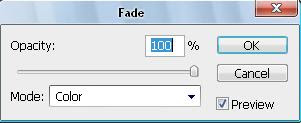
Than Here We Result:
Bonus Step: Bring Back A Hint Of Color
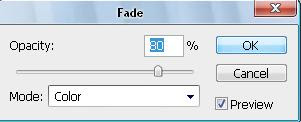
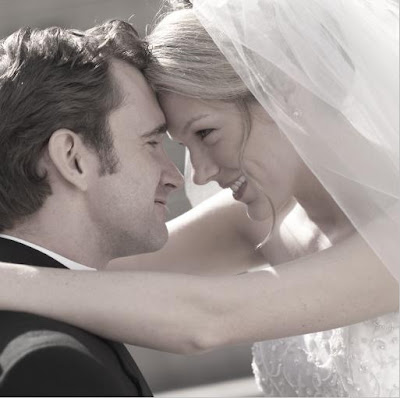
And here’s the result
Read more »
Final Image Result:
Step 1: Duplicate Background Layer
Shortcut Key.keyboard Press Ctrl+J
Step 2: Image > Adjustments > Desaturate.
keyboard shortcut, Shift+Ctrl+U.
Step 3: Go Edit > Fade Desaturate
keyboard shortcut, Shift+Ctrl+F
Step 4: Change The Blend Mode To “Color”
Opacity 100% Mode Color
Than Here We Result:
Bonus Step: Bring Back A Hint Of Color
And here’s the result

Subscribe to:
Posts (Atom)


- Follow Us on Twitter!
- "Join Us on Facebook!
- RSS
Contact