Showing posts with label best. Show all posts
Showing posts with label best. Show all posts
Wednesday, April 29, 2015
best,
book,
designer,
ebook,
for,
icon
0
comments
Icon designer ebook Best book for designer
History, theory, tips and tutorials an insight into the word on icon design
Introduction Icon For designer

Get This Book at link above
A Picture Tells a Thousand Words
With roots stretching as far back as the 1970s, the humble icon has come a long way. Evolving from black and white representations of office items into beautifully rendered illustrations of objects, symbols, characters and the same office items from the very beginning, icons have become a visual language that is understood the world over.
Where a picture will tell a thousand words, a computer icon informs, educates and reassures its audience. Because icons are used for such specific purposes, creating a successful icon design is more of a science than an art.
I came to icon design almost by accident. My first year out from University, I was hired to work in-house for a software company who needed an icons and UI illustrator. With two degrees in Multimedia and Communication Design and a portfolio of digital illustration, I stood out as a good candidate for the job.
I had never given icon design much thought beyond the occasional replacement set, but knowing that this was a rare opportunity, I decided to jump in the deep end (with both feet!). I took the offer and a week later I was up to my eyeballs in specifications, requests and a back catalogue of previous designs. I was spending most of my time in review meetings with the development team, product management and even marketing. I quickly learned that when asked, everyone has an opinion, right or wrong.
So here I was, stuck in the middle of the technical requirements of the development team and the aesthetic guides from marketing. To top it off, I was spending hours rendering images and all I had to show at the end of the day was a handful of pixels! It was really frustrating to move from print design and illustration to screen.As time progressed, I settled into the role of “icon lady” and started to see the craft and beauty in small images.
I also developed a system of project management that greatly improved my workflow (less meetings = more productivity).
During the course of Icon designer book, I will share my experiences in the field of icon design, look at rendering styles and ways to achieve them, and the many uses for icons today. This book won’t teach you how to emulate others. It won’t focus heavily on one OS over another; nor will it turn you into a master overnight. Instead it will help you create designs that will stand up to the test of time and help you better understand the constraints (and the joys) of pixel perfect rendering.
Get this book at here
Read more »
Introduction Icon For designer
Get This Book at link above
A Picture Tells a Thousand Words
With roots stretching as far back as the 1970s, the humble icon has come a long way. Evolving from black and white representations of office items into beautifully rendered illustrations of objects, symbols, characters and the same office items from the very beginning, icons have become a visual language that is understood the world over.
-->
Where a picture will tell a thousand words, a computer icon informs, educates and reassures its audience. Because icons are used for such specific purposes, creating a successful icon design is more of a science than an art.
I came to icon design almost by accident. My first year out from University, I was hired to work in-house for a software company who needed an icons and UI illustrator. With two degrees in Multimedia and Communication Design and a portfolio of digital illustration, I stood out as a good candidate for the job.
I had never given icon design much thought beyond the occasional replacement set, but knowing that this was a rare opportunity, I decided to jump in the deep end (with both feet!). I took the offer and a week later I was up to my eyeballs in specifications, requests and a back catalogue of previous designs. I was spending most of my time in review meetings with the development team, product management and even marketing. I quickly learned that when asked, everyone has an opinion, right or wrong.
So here I was, stuck in the middle of the technical requirements of the development team and the aesthetic guides from marketing. To top it off, I was spending hours rendering images and all I had to show at the end of the day was a handful of pixels! It was really frustrating to move from print design and illustration to screen.As time progressed, I settled into the role of “icon lady” and started to see the craft and beauty in small images.
I also developed a system of project management that greatly improved my workflow (less meetings = more productivity).
During the course of Icon designer book, I will share my experiences in the field of icon design, look at rendering styles and ways to achieve them, and the many uses for icons today. This book won’t teach you how to emulate others. It won’t focus heavily on one OS over another; nor will it turn you into a master overnight. Instead it will help you create designs that will stand up to the test of time and help you better understand the constraints (and the joys) of pixel perfect rendering.
Get this book at here

Wednesday, March 18, 2015
best,
effect,
gothic,
make,
photo,
picture
0
comments
Make Gothic Picture Best Photo Effect
To get started, pick a picture you want to manipulate, or use this same one.

1. Use the tool named Dodge Tool to get a whiter effect over the skin. You can find it in the left tool bar.
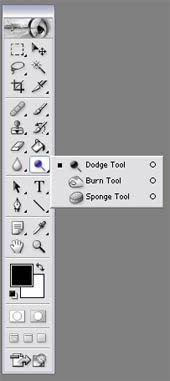
I usually use that tool in a %45 exposure.

2. Now we will desaturate the skin color with the Sponge Tool also in the left tool bar. %100 flow.
Look for it in the same place where the Dodge Tool is, you just have to click over it, and you will see another two options hidden in the same place. (my english sucks, I know it, but try to follow…)
Now that the skin looks dead enough, will work on the eyes.

3. Now pick the Dodge Tool again, and apply it over the eyes.

4. Pick a color you like for the eyes. I like light blue…
Use the color with an opacity of %18, we dont want to lose all the little details of the eye.

5. If you want to add more light to the eye, use a regular brush, white color, and select Mode: Color Dodge %35 opacity.
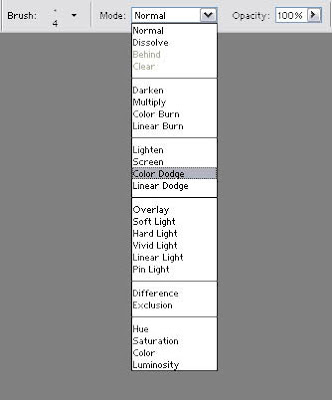
Like this…

6. Now the make up…
Black color, opacity %18, and apply it around the eye a few times. Darker in the center, and softer on the edges.

7. You can also work on the mouth with the Burn Tool also placed below the Dodge Tool.
This tool is very good when you need to add shadows or you want something to look darker. Also, dont forget to use the Blur Tool to correct the skin, and make it look softer and silky.

Read more »
1. Use the tool named Dodge Tool to get a whiter effect over the skin. You can find it in the left tool bar.
I usually use that tool in a %45 exposure.
2. Now we will desaturate the skin color with the Sponge Tool also in the left tool bar. %100 flow.
Look for it in the same place where the Dodge Tool is, you just have to click over it, and you will see another two options hidden in the same place. (my english sucks, I know it, but try to follow…)
Now that the skin looks dead enough, will work on the eyes.
3. Now pick the Dodge Tool again, and apply it over the eyes.
4. Pick a color you like for the eyes. I like light blue…
Use the color with an opacity of %18, we dont want to lose all the little details of the eye.
5. If you want to add more light to the eye, use a regular brush, white color, and select Mode: Color Dodge %35 opacity.
Like this…
6. Now the make up…
Black color, opacity %18, and apply it around the eye a few times. Darker in the center, and softer on the edges.
7. You can also work on the mouth with the Burn Tool also placed below the Dodge Tool.
This tool is very good when you need to add shadows or you want something to look darker. Also, dont forget to use the Blur Tool to correct the skin, and make it look softer and silky.
Tuesday, March 17, 2015
best,
file,
for,
graphics,
is,
type,
which,
your
0
comments
Which File Type is Best for Your Graphics
Every time a graphic file is saved on the computer, the program saves the artwork with a specific file format. Some formats are high resolution, some are low; some are specific to the native application (like .doc files are MS Word), while others can be used by different computers and different applications.
Just as different software programs are good at performing different tasks, different file formats are good for different purposes. You wouldnt use MS Word to construct a large table of financial data; youd use MS Excel. The same principle goes for file formats, some are suited for lower-resolution web graphics and email, and others are high-resolution graphics for printing.
Who cares? You should…
This can be down right confusing for a non-expert. In fact, it can be disastrous to spend hours working on a file and have it in the wrong format. Artwork in the wrong file format might be:
All of these will result in costing your more time and money. The good news is: experienced business designers will know from experience exactly which file type to use for each specific circumstance.
For those looking for a little extra knowledge, or gluttons for punishment, here is a quick synopsis of when to use which file type:
.jpg - "jay peg", great for web sites and email, this file format compresses continuous-tone images (like a picture with millions of colors) down to a size that can be downloaded of the Internet quickly. The downside to this format is that compressing the image too much will cause it to visibly degrade and look jagged.
.gif - "gifs", pronounced with a "G", not a "J", also a terrific file type for the Internet and emailing. Gifs do an incredible job of compressing images and making them suitable for fast downloads. In contrast to the .jpg, the .gif is not suited for non-continuous color images, but solid colored images (some cartoons or clip art is a good example of this). One added bonus is that the .gif images can be placed on a web page with an clear background, so you layer them on a web page. Sometimes the artwork has a sharp, unattractive border when the images background invisible, when this happens, go with the next file type, the .png.
.png - "pings" or "p.n.gs:, this format can act as a hybrid between the .jpg and the .gif, it allows users to compress either non/continuous-tone color images, and allow you to put the on a web page with a clear background. .Pngs are usually larger in file size than the previous file formats but they allow people to save artwork to be layered on web pages or other artwork without any sharp or disruptive border. .Pngs are extremely versatile, but they usually result in larger files and longer download times.
.eps - "encapsulated postScript", these files can be vector or raster - which makes them extremely powerful, this goes beyond the scope of this article. Professional printers and printable advertising media, like a magazine, will typically ask that the artwork be saved as an .eps file or perhaps a .tif. Recently the .pdf document has made some headway into certain areas of printed media as well.
.tif - "tagged image file format", a versatile color space file format (CMYK, RGB, Grayscale) and cross-platform between Mac and PC. The .tif file format was originally intended for scanning, and a lot of scanned images are saved as tifs. Printers and advertisers will often request or permit final artwork to be designed in a tif.
.pdf - "portable document format", Adobes native file format that is read by a program called Adobe Acrobat. Most computer users have Acrobat on their system, if they dont they can download Acrobat Reader for free. The .pdf has a wide range of uses, including a lot of usage on web, interactive forms and they can even be used for printing.
Top 5 Indications Youve Used the Wrong File Format
The printer you are using starts to laugh at you
The printer you are using starts to cry in front of you
Colleagues complain that you are filling up her/his mailbox with large image files
Prospects visiting your web site indicate your company logo looked out of focus and more like a blob of mustard and relish
Youve decided on which file format to use based on a novel magic 8 ball
Read more »
Just as different software programs are good at performing different tasks, different file formats are good for different purposes. You wouldnt use MS Word to construct a large table of financial data; youd use MS Excel. The same principle goes for file formats, some are suited for lower-resolution web graphics and email, and others are high-resolution graphics for printing.
Who cares? You should…
This can be down right confusing for a non-expert. In fact, it can be disastrous to spend hours working on a file and have it in the wrong format. Artwork in the wrong file format might be:
- Rejected by a printer
- Incompatible with a computer
- Result in slower download times
- Reproduce over the Internet or on print with unpredictable or awful results.
All of these will result in costing your more time and money. The good news is: experienced business designers will know from experience exactly which file type to use for each specific circumstance.
For those looking for a little extra knowledge, or gluttons for punishment, here is a quick synopsis of when to use which file type:
.jpg - "jay peg", great for web sites and email, this file format compresses continuous-tone images (like a picture with millions of colors) down to a size that can be downloaded of the Internet quickly. The downside to this format is that compressing the image too much will cause it to visibly degrade and look jagged.
.gif - "gifs", pronounced with a "G", not a "J", also a terrific file type for the Internet and emailing. Gifs do an incredible job of compressing images and making them suitable for fast downloads. In contrast to the .jpg, the .gif is not suited for non-continuous color images, but solid colored images (some cartoons or clip art is a good example of this). One added bonus is that the .gif images can be placed on a web page with an clear background, so you layer them on a web page. Sometimes the artwork has a sharp, unattractive border when the images background invisible, when this happens, go with the next file type, the .png.
.png - "pings" or "p.n.gs:, this format can act as a hybrid between the .jpg and the .gif, it allows users to compress either non/continuous-tone color images, and allow you to put the on a web page with a clear background. .Pngs are usually larger in file size than the previous file formats but they allow people to save artwork to be layered on web pages or other artwork without any sharp or disruptive border. .Pngs are extremely versatile, but they usually result in larger files and longer download times.
.eps - "encapsulated postScript", these files can be vector or raster - which makes them extremely powerful, this goes beyond the scope of this article. Professional printers and printable advertising media, like a magazine, will typically ask that the artwork be saved as an .eps file or perhaps a .tif. Recently the .pdf document has made some headway into certain areas of printed media as well.
.tif - "tagged image file format", a versatile color space file format (CMYK, RGB, Grayscale) and cross-platform between Mac and PC. The .tif file format was originally intended for scanning, and a lot of scanned images are saved as tifs. Printers and advertisers will often request or permit final artwork to be designed in a tif.
.pdf - "portable document format", Adobes native file format that is read by a program called Adobe Acrobat. Most computer users have Acrobat on their system, if they dont they can download Acrobat Reader for free. The .pdf has a wide range of uses, including a lot of usage on web, interactive forms and they can even be used for printing.
Top 5 Indications Youve Used the Wrong File Format
The printer you are using starts to laugh at you
The printer you are using starts to cry in front of you
Colleagues complain that you are filling up her/his mailbox with large image files
Prospects visiting your web site indicate your company logo looked out of focus and more like a blob of mustard and relish
Youve decided on which file format to use based on a novel magic 8 ball
Subscribe to:
Posts (Atom)


- Follow Us on Twitter!
- "Join Us on Facebook!
- RSS
Contact