Showing posts with label book. Show all posts
Showing posts with label book. Show all posts
Tuesday, May 12, 2015
book,
for,
photographers,
photoshop
0
comments
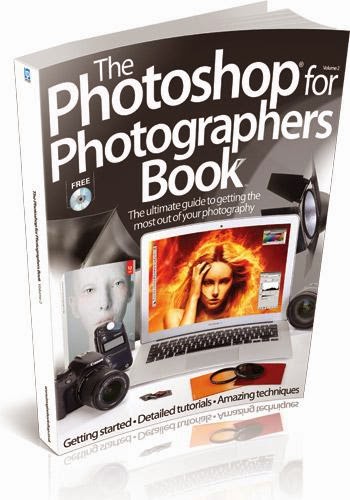
Photoshop For Photographers Book
Photoshop For Photographers Book
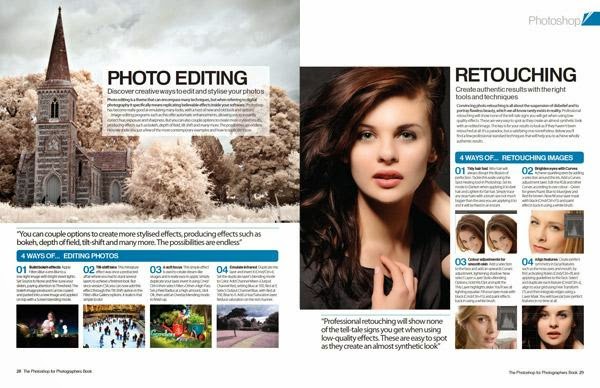
Get the most out of your photography by mastering Photoshop’s essential tools, filters and features with Photoshop for Photographers’ easy-to-follow step-by-step tutorials. This bookazine has 228 pages

Portrait
- Retouch your people pictures to perfection.
Landscape
- Produce and edit your best ever landscapes.
Black & White
- Create monochromatic masterpieces.
Architecture
- Shoot and edit beautiful buildings from around the world.
Also inside...
Ultimate guides
- The ultimate guide to Photoshop
- The ultimate guide to photography
Portrait
- Perfect portraits on location
- 20 great tips for portrait photographs
- Master the Clone Stamp tool
- Use the Refine Edge tool
- Turn a photo into a sketch
- Photomontage your photographs
- Clone composites
- Fake a light leak
- Remove red-eye
Landscape
- Shoot stunning landscape photos
- 20 great tips for landscapes
- Fix exposure
- Build a new landscape
- Get the Lomo look
- Edit your photographs with histograms
Black & White
- Master monochrome photography
- 20 great tips for black and whites
- Convert images to black and white
- Get a classic effect with gradient maps
- Hand tint black-and-white images
- Emphasise the eyes
- Achieve high-key effects
Architecture
- Master architecture photography
- 20 great tips for incredible interiors
- Fix barrel distortion with Lens Correction
- Edit colours with the Photo Filter tool
- Make a silhouette
- Create line art
- Get sketching
Macro
- Capture striking macro shots
- 20 great tips for photographing flowers
- Merge textures and photos
- Make a magic selection
- Make a macro mosaic
- Rescue dull shots with Brightness/Contrast
Wildlife
- Capture perfect wildlife pictures
- 20 great tips for wildlife
- Master the lighting effects filter
- Capture perfect pet portraits
- Design animal hybrids
Low light
- Perfect low-light photographs
- 20 great tips for low light
- Add drama with Dodge and Burn
- Blend the light
- Fake a star trail
- Set off some digital fireworks
- Create a sunset using gradient maps
- Fix noise with the Reduce Noise filter
Still life
- Paint with light
- 20 great tips for still-life photography
- 20 great tips for photographing food
- Re-create realistic shadows
- Experiment with Masks
- Inject a new colour
Travel
- Document the streets
- 20 great tips for travel captures
- Transform a cityscape
- Paint a travel photograph
- Control HDR with layers
- Create a wood effect painting
Creative
- Create a comic book effect
- Produce smoke art
- Add impact to your photos
- Miniaturise your photos
- Fake a motion blur
- Add a fisheye effect to your shots
- Turn photos into 3D images
- Make a vintage travel poster
- Add a retro filter to your shots
Free with this bookazine...
- The ultimate creative tools to help you learn Photoshop.
- All the tutorial files you need.
- Video guides from the pros
- 30 creative stock images


Wednesday, April 29, 2015
a,
adobe,
book,
classroom,
cs6,
illustrator,
in,
pdf,
tutorial
1 comments
Adobe Illustrator CS6 Tutorial PDF Classroom in a Book
Adobe Illustrator CS6 Tutorial Pdf Classroom in a Book
2012 | PDF + EPUB | 480 pages | 181 MB

Creative professionals seeking the fastest, easiest, most comprehensive way to learn Adobe Illustrator CS6 choose Adobe Illustrator CS6 Classroom Pdf in a Book from the Adobe Creative Team at Adobe Press. The 15 project-based lessons in this book show readers step-by-step the key techniques for working in Illustrator CS6 and how to create vector artwork for virtually any project and across multiple media: print, websites, interactive projects, and video.
in addition to learning the key elements of the Illustrator interface, this completely revised CS6 edition covers the new tracing engine with improved shape and color recognition, a new pattern toolset with on-artboard controls and one-click tiling, a completely overhauled performance engine and modernized user interface for working more efficiently and intuitively, and more.
“The Classroom in a Book series is by far the best training material on the market. Everything you need to master the software is included: clear explanations of each lesson, step-by-step instructions, and the project files for the students.” —Barbara Binder, Adobe Certified Instructor, Rocky Mountain Training
Classroom in a Book®, the best-selling series of hands-on software training workbooks, helps you learn the features of Adobe software quickly and easily. Classroom in a Book offers what no other book or training program does—an official training series from Adobe Systems Incorporated, developed with the support of Adobe product experts.
Read more »
2012 | PDF + EPUB | 480 pages | 181 MB
Creative professionals seeking the fastest, easiest, most comprehensive way to learn Adobe Illustrator CS6 choose Adobe Illustrator CS6 Classroom Pdf in a Book from the Adobe Creative Team at Adobe Press. The 15 project-based lessons in this book show readers step-by-step the key techniques for working in Illustrator CS6 and how to create vector artwork for virtually any project and across multiple media: print, websites, interactive projects, and video.
in addition to learning the key elements of the Illustrator interface, this completely revised CS6 edition covers the new tracing engine with improved shape and color recognition, a new pattern toolset with on-artboard controls and one-click tiling, a completely overhauled performance engine and modernized user interface for working more efficiently and intuitively, and more.
“The Classroom in a Book series is by far the best training material on the market. Everything you need to master the software is included: clear explanations of each lesson, step-by-step instructions, and the project files for the students.” —Barbara Binder, Adobe Certified Instructor, Rocky Mountain Training
Adobe Illustrator CS6 Tutorial PDF Classroom in a Book (2012)
Classroom in a Book®, the best-selling series of hands-on software training workbooks, helps you learn the features of Adobe software quickly and easily. Classroom in a Book offers what no other book or training program does—an official training series from Adobe Systems Incorporated, developed with the support of Adobe product experts.
Adobe Illustrator CS6 Tutorial PDF Download
adobe,
book,
cs6,
digital,
for,
pdf,
photographers,
photoshop,
the,
tutorial
1 comments
The Adobe Photoshop CS6 Book Tutorial Pdf for Digital Photographers
The Adobe Photoshop CS6 Book Tutorial Pdf for Digital Photographers

ABOUT THE AUTHOR
Scott is Editor, Publisher, and co-founder of Photoshop User magazine, Executive Editor and Publisher of Light It (the how-to magazine for studio lighting and off-camera flash), and is host of The Grid, the weekly live videocast talk show for photographers, as well as co-host of the top-rated weekly videocast series, Photoshop User TV.
The Adobe Photoshop CS6 Book Tutorial Pdf for Digital Photographers
-->
He is President of the National Association of Photoshop Professionals (NAPP), the trade association for Adobe® Photoshop® users, and he’s President of the training, education, and publishing firm,
For more information on Scott, visit him at:
-->
Download The Adobe Photoshop CS6 Book Tutorial Pdf for Digital Photographers
Read more »
ABOUT THE AUTHOR
Scott is Editor, Publisher, and co-founder of Photoshop User magazine, Executive Editor and Publisher of Light It (the how-to magazine for studio lighting and off-camera flash), and is host of The Grid, the weekly live videocast talk show for photographers, as well as co-host of the top-rated weekly videocast series, Photoshop User TV.
The Adobe Photoshop CS6 Book Tutorial Pdf for Digital Photographers
-->
He is President of the National Association of Photoshop Professionals (NAPP), the trade association for Adobe® Photoshop® users, and he’s President of the training, education, and publishing firm,
For more information on Scott, visit him at:
His daily blog: http://scottkelby.com
Google+: Scottgplus.com
Twitter: http://twitter.com@scottkelby
Facebook: www.facebook.com/skelby
Google+: Scottgplus.com
Twitter: http://twitter.com@scottkelby
Facebook: www.facebook.com/skelby
Seven Things You’ll Wish You Had Known Before Reading The Adobe Photoshop CS6 Book Tutorial Pdf for Digital Photographers
It’s really important to me that you get a lot out of reading The Adobe Photoshop CS6 Book Tutorial Pdf for Digital Photographers, and one way I can help is to get you to read these seven quick things about the book that you’ll wish later you knew now. For example, it’s here that I tell you about where to download something important, and if you skip over this, eventually you’ll send me an email asking where it is, but by then you’ll be really aggravated, and well… it’s gonna get ugly. We can skip all that (and more), if you take two minutes now and read these seven quick things. I promise to make it worth your while.
You don’t have to read The Adobe Photoshop CS6 Book Tutorial Pdf for Digital Photographers in order. I designed Adobe Photoshop CS6 Book Tutorial Pdf so you can turn right to the technique you want to learn, and start there. I explain everything as I go, step-by-step, so if you want to learn how to remove dust spots from a RAW image, just turn to page 84, and in a couple of minutes, you’ll know. I did write the book in a logical order for learning CS6, but don’t let that tie your hands—jump right to whatever technique you want to learn— you can always go back, review, and try other stuff.
Download The Adobe Photoshop CS6 Book Tutorial Pdf for Digital Photographers
History, theory, tips and tutorials an insight into the word on icon design
Introduction Icon For designer

Get This Book at link above
A Picture Tells a Thousand Words
With roots stretching as far back as the 1970s, the humble icon has come a long way. Evolving from black and white representations of office items into beautifully rendered illustrations of objects, symbols, characters and the same office items from the very beginning, icons have become a visual language that is understood the world over.
Where a picture will tell a thousand words, a computer icon informs, educates and reassures its audience. Because icons are used for such specific purposes, creating a successful icon design is more of a science than an art.
I came to icon design almost by accident. My first year out from University, I was hired to work in-house for a software company who needed an icons and UI illustrator. With two degrees in Multimedia and Communication Design and a portfolio of digital illustration, I stood out as a good candidate for the job.
I had never given icon design much thought beyond the occasional replacement set, but knowing that this was a rare opportunity, I decided to jump in the deep end (with both feet!). I took the offer and a week later I was up to my eyeballs in specifications, requests and a back catalogue of previous designs. I was spending most of my time in review meetings with the development team, product management and even marketing. I quickly learned that when asked, everyone has an opinion, right or wrong.
So here I was, stuck in the middle of the technical requirements of the development team and the aesthetic guides from marketing. To top it off, I was spending hours rendering images and all I had to show at the end of the day was a handful of pixels! It was really frustrating to move from print design and illustration to screen.As time progressed, I settled into the role of “icon lady” and started to see the craft and beauty in small images.
I also developed a system of project management that greatly improved my workflow (less meetings = more productivity).
During the course of Icon designer book, I will share my experiences in the field of icon design, look at rendering styles and ways to achieve them, and the many uses for icons today. This book won’t teach you how to emulate others. It won’t focus heavily on one OS over another; nor will it turn you into a master overnight. Instead it will help you create designs that will stand up to the test of time and help you better understand the constraints (and the joys) of pixel perfect rendering.
Get this book at here
Read more »
Introduction Icon For designer
Get This Book at link above
A Picture Tells a Thousand Words
With roots stretching as far back as the 1970s, the humble icon has come a long way. Evolving from black and white representations of office items into beautifully rendered illustrations of objects, symbols, characters and the same office items from the very beginning, icons have become a visual language that is understood the world over.
-->
Where a picture will tell a thousand words, a computer icon informs, educates and reassures its audience. Because icons are used for such specific purposes, creating a successful icon design is more of a science than an art.
I came to icon design almost by accident. My first year out from University, I was hired to work in-house for a software company who needed an icons and UI illustrator. With two degrees in Multimedia and Communication Design and a portfolio of digital illustration, I stood out as a good candidate for the job.
I had never given icon design much thought beyond the occasional replacement set, but knowing that this was a rare opportunity, I decided to jump in the deep end (with both feet!). I took the offer and a week later I was up to my eyeballs in specifications, requests and a back catalogue of previous designs. I was spending most of my time in review meetings with the development team, product management and even marketing. I quickly learned that when asked, everyone has an opinion, right or wrong.
So here I was, stuck in the middle of the technical requirements of the development team and the aesthetic guides from marketing. To top it off, I was spending hours rendering images and all I had to show at the end of the day was a handful of pixels! It was really frustrating to move from print design and illustration to screen.As time progressed, I settled into the role of “icon lady” and started to see the craft and beauty in small images.
I also developed a system of project management that greatly improved my workflow (less meetings = more productivity).
During the course of Icon designer book, I will share my experiences in the field of icon design, look at rendering styles and ways to achieve them, and the many uses for icons today. This book won’t teach you how to emulate others. It won’t focus heavily on one OS over another; nor will it turn you into a master overnight. Instead it will help you create designs that will stand up to the test of time and help you better understand the constraints (and the joys) of pixel perfect rendering.
Get this book at here
Wednesday, April 1, 2015
a,
book,
cover,
create,
magazine,
or,
retro,
style
0
comments
Create A Retro Style Book OR Magazine Cover
Create A Retro Style Book OR Magazine Cover
We see previously that how to create a simple Magazine cover. Here we can see a very simple but attractive retro style magazine cover making only in few steps..
Final view

Step 1:
Create new file and get your content related photo as a background.. Ive make a architects magazine cover so I choose a Building photo..
( Click Here to take this image )
.jpg)
Make a new layer (Ctrl_Shft+N)
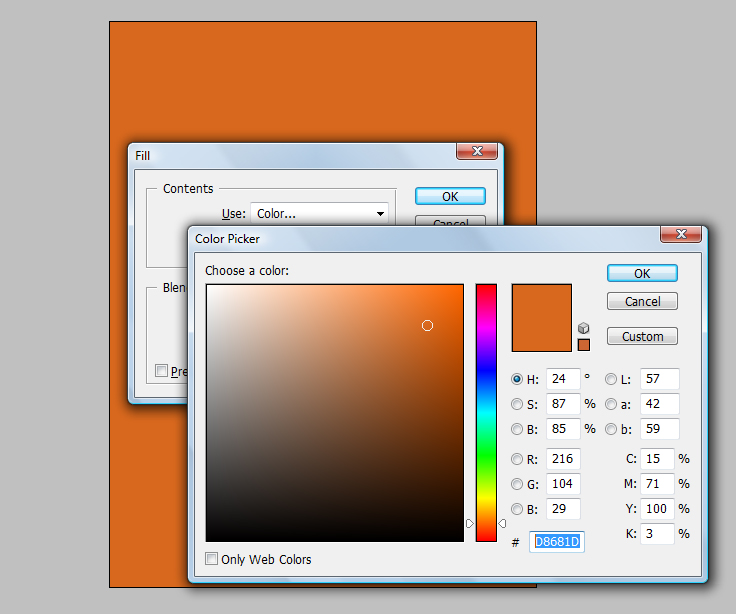
And fill the background with "#D8681D" color. (Shft+f5)
Step 3:
Now download some vector buildings from google..
and take them in the project.. Ive choose one vector building..

Create new file and get your content related photo as a background.. Ive make a architects magazine cover so I choose a Building photo..
( Click Here to take this image )
And fill the background with "#D8681D" color. (Shft+f5)
Make the opacity of layer to 85% - 90% .
Step 2:
Now select your font (Use Slandered fonts used for cover design) and add title and subtitle.
Remember that Title has larger font size than Subtitle.

Step 2:
Now select your font (Use Slandered fonts used for cover design) and add title and subtitle.
Remember that Title has larger font size than Subtitle.
Step 3:
Now download some vector buildings from google..
and take them in the project.. Ive choose one vector building..
Make this Layer property to "Multiply"

Done..!!
Tuesday, March 17, 2015
a,
book,
comic,
convert,
into,
photograph,
real
0
comments
Convert a Real Photograph into Comic Book Photograph
Step 1: open any picture in Photoshop you feel right for this effect.

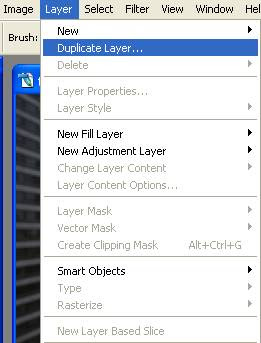
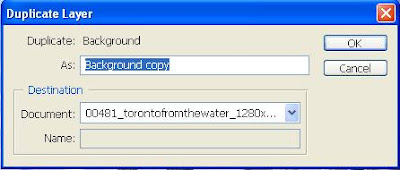
Step 2: Duplicate copy of the Background by Selecting the Duplicate Layer Option from the Layer Menu. We do this just in case any mistake is done then we do not end up ruining the original Image.
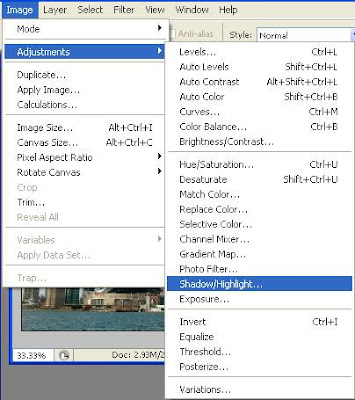
Step 3: Now Increase the brightness of the photograph by select the option Shadow/Highlight from the image menu as shown in the screenshot below.
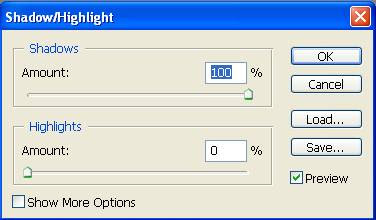
In the Shadow/Highlight Dialog box take the shadow slider to 100% to fully brighten up the image.

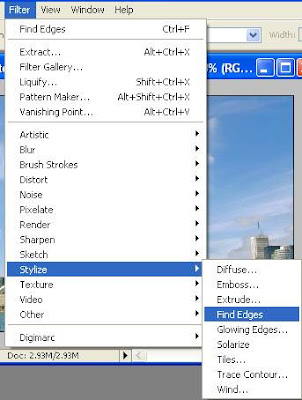
Step 4: Go to the Filter menu and select the Find Edges menu, this option will convert the Photograph into an image given below.

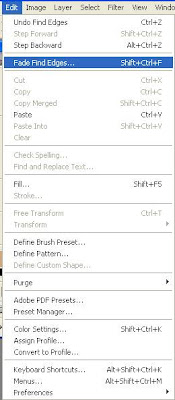
Step 5: Using the Fade Find Edges option in the Edit menu we will get the desired effect.
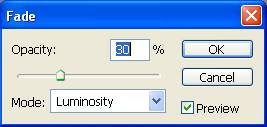
In the Fade Find Edges Dialog box change the Mode Menu to Luminosity from Normal and move the Opacity Slider till you get the desired effect.
The Final Image is given below.

Read more »
Step 2: Duplicate copy of the Background by Selecting the Duplicate Layer Option from the Layer Menu. We do this just in case any mistake is done then we do not end up ruining the original Image.
Step 3: Now Increase the brightness of the photograph by select the option Shadow/Highlight from the image menu as shown in the screenshot below.
In the Shadow/Highlight Dialog box take the shadow slider to 100% to fully brighten up the image.
Step 4: Go to the Filter menu and select the Find Edges menu, this option will convert the Photograph into an image given below.
Step 5: Using the Fade Find Edges option in the Edit menu we will get the desired effect.
In the Fade Find Edges Dialog box change the Mode Menu to Luminosity from Normal and move the Opacity Slider till you get the desired effect.
The Final Image is given below.
Subscribe to:
Posts (Atom)


- Follow Us on Twitter!
- "Join Us on Facebook!
- RSS
Contact